File Permissions and Access Control Lists
**
🚀 Unveiling the Power of DevOps: Mastering Linux File Permissions and Access Control Lists 🛡️**
Greetings, fellow DevOps enthusiasts! Today, we embark on an exciting journey into the heart of Linux, where security meets control, and permissions reign supreme. Join us as we dive into the captivating world of file permissions and ownership, sprinkle in a touch of magic with Access Control Lists (ACLs), and empower ourselves with the art of securing our digital fortresses. 🌐🔐
Task 1: Opening the Door to File Permissions
Let's kick off our DevOps adventure by creating a simple file and unveiling its secrets through the command line.
bashCopy code# Let there be a file
$ touch my_file.txt

# Gaze into the file's soul
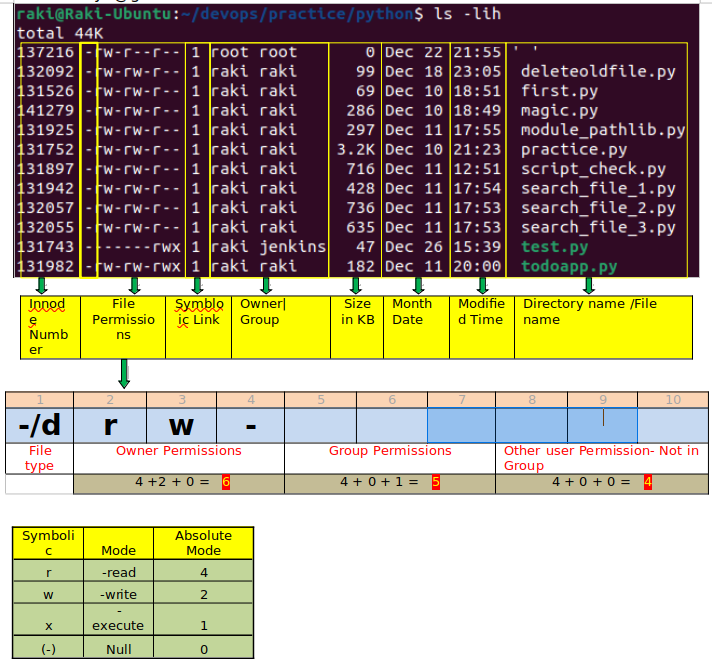
$ ls -ltr my_file.txt
Behold the mystical code you shall encounter:
cssCopy code-rw-r--r-- 1 username groupname 0 Aug 6 12:34 my_file.txt
Changing the Symphony of User Permissions
No DevOps journey is complete without mastering the symphony of permissions. With a flourish of commands, we can dictate who can read, write, or execute our files.
bashCopy code# Grant the owner write permission
$ chmod u+w my_file.txt

# Witness the transformation
$ ls -ltr my_file.txt
See the transformation unfold before your very eyes:
diffCopy code-rw-rw-r-- 1 username groupname 0 Aug 6 12:34 my_file.txt
Task 2: Crafting a Tale of File Permissions
Article Title: "Demystifying Linux File Permissions: Your Key to Control and Security"
Imagine a world where files are like ancient scrolls, and permissions are the keys to unlocking their secrets. In our article, we'll embark on a quest to unravel the enigma of Linux file permissions and ownership. With just a few commands—chmod, chown, and chgrp—you'll wield the power to shape your system's security realm. From guarding scripts to protecting treasures, this article explores how permissions create the tapestry of security that weaves through the DevOps landscape. 📜🔑
Task 3: Unveiling Access Control Lists (ACLs)
Unlocking the Vault of ACLs
In the realm of DevOps, ordinary security sometimes requires an extraordinary touch. Enter Access Control Lists (ACLs), a spellbinding feature that grants you unparalleled control over your files. Behold:
bashCopy code# Peer into the abyss of ACLs
$ getfacl my_file.txt
Observe the incantation's response:
arduinoCopy code# file: my_file.txt
# owner: username
# group: groupname
user::rw-
group::rw-
other::r--
Weaving New Spells with ACLs
Prepare to be amazed as we wield setfacl to weave new spells of access control:
bashCopy code# Enchant the file with new ACLs
$ setfacl -m u:anotheruser:rw my_file.txt

# Witness the enchantment unfold
$ getfacl my_file.txt
Behold the evolved incantation:
makefileCopy code# file: my_file.txt
# owner: username
# group: groupname
user::rw-
user:anotheruser:rw-
group::rw-
other::r--
Conclusion: Empowering the DevOps Mage
And there you have it, fellow DevOps mages! Armed with the knowledge of file permissions, ownership, and the mystical Access Control Lists, you are ready to conquer the Linux realm with the finesse of a seasoned wizard. Secure your digital kingdom, shape your security narrative, and continue your DevOps journey with newfound empowerment and a touch of enchantment. 🧙♂️✨
Let the Linux adventures continue! 🚀🌟


